
Deciding what to build is the new bottleneck. Attributing ideas to customers and revenue helps fix that.
Coding agents made building cheap. Deciding didn't get easier. Why AI product discovery needs a count first, and a five-question check before you build.

For most of software’s history, building was the brake. A feature took weeks, so a weak idea usually died in a prioritization meeting before anyone wrote a line of code.
Coding agents took the brake off. A feature can now go from spec to pull request in an afternoon. The hard question moved from “can we build it?” to “should we?”, and most teams still answer it the old way: a few calls someone remembers, a Slack thread, a hunch.
This post is about that second question. It covers why AI product discovery tools that read everything still leave you guessing, why the count has to come before the summary, and a five-question check to run before anything goes to an agent.
The cost gate is gone
When building was expensive, the cost of a feature did a lot of quiet filtering. Nobody spent three sprints on a request that one customer mentioned once. The price of building forced a conversation about demand.
That filter is gone. Stefan Wolpers made the point in DZone this month: deciding what to build is becoming the core job now that code is no longer the constraint (DZone). Analytics vendors are shipping agents that promise one to two day cycles from insight to release (weekly AI digest, Nov 16).
Faster shipping is good. Faster shipping of the wrong thing is just a faster way to fill a backlog with features nobody uses. The bottleneck moved upstream, to the decision.
Reading everything is not the same as deciding
The obvious move is to point an AI at your customer conversations. Most product teams have done some version of it. In our own research, about 60% of the product teams we talked to have wired their calls into Claude, and fewer than 1 in 8 of them can count anything with it (Claude can’t count your customer feedback).
Ask a discovery agent that has read 400 calls what customers want, and you get a confident paragraph. It reads well. It names three themes. It quotes a customer or two.
A decision needs something else:
- 🔢 How many customers asked for this, counted as distinct accounts, not mentions.
- 🏢 Which customers, by name and segment.
- 💵 What they’re worth, in revenue today and revenue at risk.
- 🔗 The quote behind each one, so anyone can check the claim.
A summary answers “what are people saying?”. A decision needs “how many, who, and how much?”. Those are different questions, and the first one can’t stand in for the second.
Why the count has to come first
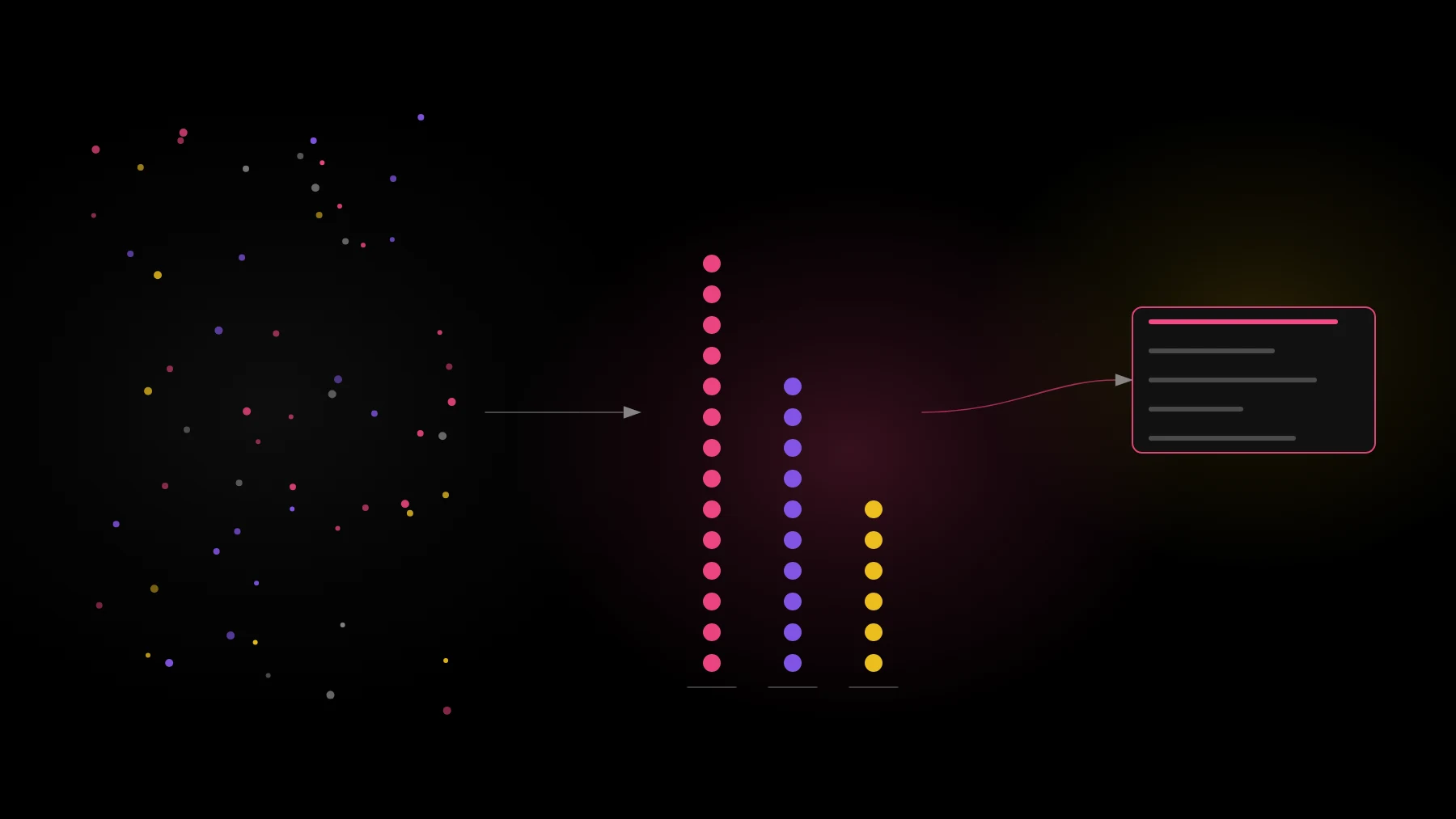
Here is the mechanical reason. Past roughly 10 transcripts, a model can’t hold everything at once. A search step picks the chunks that look relevant, and the model summarizes those. The answer still sounds complete. It’s a sample.
Counting is a different kind of work. To know that 23 accounts asked for SSO, you have to read every conversation, pull out each request, decide which requests mean the same thing, match each one to an account, and join the account to revenue. That’s a pipeline job. Even the DZone piece above puts counting tickets and revenue at risk with deterministic tools rather than with the model (DZone).
So the order matters. Count first, then let the model write on top of the count. The model is great at the second step: turning a counted, cited set of requests into a brief, a spec or a set of options. It’s unreliable at the first.
”Count first, then let the model write on top of the count.”
If you’ve built your own setup, you don’t have to throw it away. Our build vs buy scorecard walks through when a homegrown pipeline is enough and when it stops keeping up.
See your own customer requests counted, with the quotes behind them. Book a demo
A weekly decision check
Before anything goes to an agent to build, run five questions against the evidence. If any answer is “not sure”, the idea isn’t ready yet.
- 🙋 Who asked? Named accounts, not “customers”.
- 🔢 How many? Distinct accounts in the last 90 days, not the number of times it came up.
- 💵 What are they worth? Current revenue, plus any renewal or expansion tied to it.
- 💬 What’s the quote? The exact sentence, linked to the call or ticket it came from.
- 📈 What changed since last week? New accounts, a big customer joining the list, or the request going quiet.
The fifth question is the one teams skip. A count is a snapshot. A request that grew from 4 accounts to 11 in a month tells you more than one that has sat at 12 since spring. Run the check weekly, on the same definitions, and the trend shows up on its own.
Keep the human decision
None of this means the agent decides. Counting makes the decision better informed. It doesn’t make it automatic.
One habit helps a lot: ask for two briefs from the same counted evidence. One argues for the current plan. One argues against it, using the requests the plan leaves out. Read both before the roadmap review.
It does two things. It makes the trade-off visible, because both briefs cite the same numbers. And it keeps the judgment where it belongs, with the people who know the strategy, the market and the team.
Building got cheap. Deciding didn’t. The teams that win this cycle won’t be the ones that ship the most. They’ll be the ones that know, before the agent starts, how many customers asked and what they’re worth.
”Building got cheap. Deciding didn’t.”
Count what your customers are asking for, then decide. See it on your own calls in a 30-minute walkthrough. Book a demo
FAQ
How do I use AI for product discovery? Use AI in two steps. First, a pipeline reads every customer conversation, extracts requests, counts distinct accounts and joins revenue. Second, a model writes briefs and specs on top of that counted, cited set. Asking a model to do both at once gets you a fluent summary of a sample.
Why can’t an AI model count customer requests on its own? Past roughly 10 transcripts, a search step picks the chunks that look relevant and the model summarizes those. It never sees every conversation, so it can’t give a reliable count of distinct customers.
What should I check before an AI agent builds a feature? Five things: who asked, how many distinct accounts, what they’re worth, the exact quote behind each request, and what changed since last week.