
October 2026 Release Notes: One-Click Agent Connection, Workspace Sharing, and Customer Tags
Everything since August: connect your AI agent in one click, 20 free hours for new workspaces, share chat conversations across your workspace, tag customers and filter evidence by tag, email sign-in, complete signal search, and four new chat models.
TL;DR
After August took Evermuse onto your desktop and into your AI client, the last two months were about three things: getting started faster, making your work easier to share and organize, and making sure the evidence underneath is complete and dependable. These notes cover everything new in September and October. The shortlist:
- One-click agent connection: Click Allow and your AI agent is connected, with no extra screen to get through.
- 20 free hours for new workspaces: New workspaces start with 1,200 credits, up from 300.
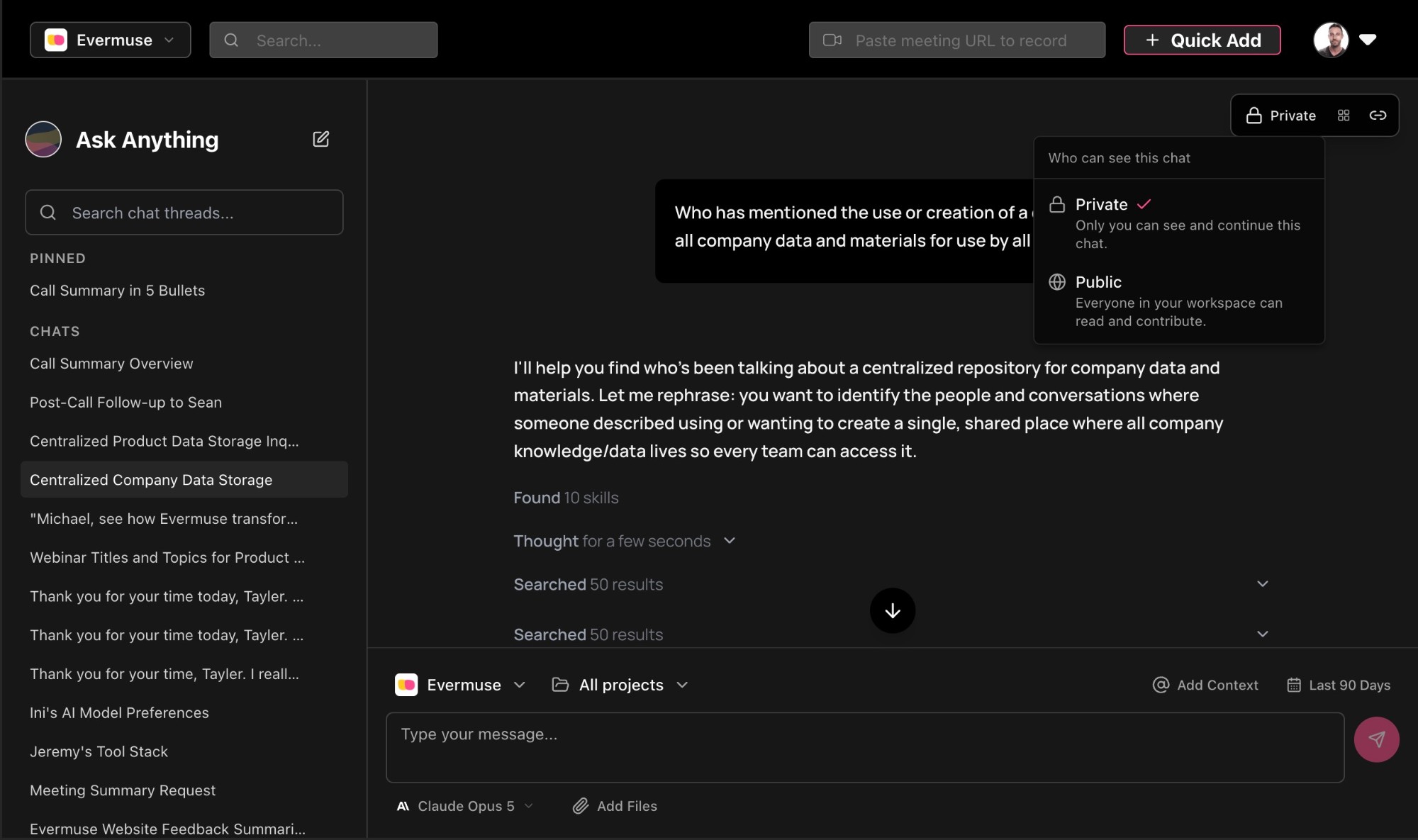
- Workspace conversation sharing: Share chat threads with your whole workspace, pin the ones that matter, and copy any message as markdown, rich text, or plain text.
- Customer tags: Create tags inline and filter evidence by tag, in the app and over MCP.
- Every signal, everywhere: Chat, MCP search, skills, and reports now see every signal, including ones from bot-recorded meetings and the Ingest API.
- Email and password sign-in: Sign in without a Google or Microsoft account, with password reset and verified email built in.
- Four new models: GPT-6 Astra, Claude Fable 5.1, GPT-6.1 Sol, and Gemini 4 Argon join the chat model selector.
- A stronger MCP: Update signals, gate new signal types behind approval, and connect from more clients with clearer setup.
🔌 Connect your agent in one click
The moment you connect Claude or another AI client to Evermuse is the moment it starts working from your real customer evidence. We removed the friction around that moment.
- Allow means done. Clicking Allow on the consent page finishes the connection straight away, with no “Back to Claude” screen to click through.
- A nudge to finish setup. New workspaces that haven’t run setup yet now get a reminder, so the connection doesn’t sit unused.
- A setup prompt you can copy. Connect MCP, Settings, and the consent page all include a ready-to-paste prompt that walks your agent through setup.
🎁 20 free hours for new workspaces
Five hours of conversations is rarely enough to see the patterns in what your customers are saying. Twenty is a much better test.
- 1,200 credits to start. New workspaces now begin with 20 hours, up from 300 credits (5 hours).
- Applies to new workspaces. Existing workspaces keep their current balance.
🤝 Share conversations with your workspace
A great chat thread used to live and die in one person’s sidebar. Now the analysis you do in Evermuse can travel with the rest of your team.
- Share a thread with your workspace. Teammates can open the same conversation, see the evidence behind it, and pick up where you left off instead of re-running the research.
- Pin and compact threads. Keep the threads you return to at the top of your list, in a denser view that fits more on screen.
- Copy any message your way. Grab a response as markdown, rich text, or plain text, so it pastes cleanly into a PRD, a Slack update, or a doc.
- Chat follows you across products. Switch products and your open thread comes with you instead of being stranded.
🏷️ Customer tags
Slice your evidence by the segments that matter to you - plan tier, region, persona, pilot cohort - without leaving the flow of your work.
- Create tags inline. Tag a customer right where you’re looking at them, no settings detour.
- Filter evidence by tag. Narrow signals and conversations to a tagged group of customers in the app.
- Available over MCP, too. Your AI client can filter by the same tags, so “what are enterprise customers saying about onboarding?” just works.
🔎 Every signal, everywhere
Your chats, skills, and reports are only as good as the evidence they can see. We found and fixed several gaps that were hiding signals.
- Calendar-bot recordings are searchable from the start. Signals from bot-recorded meetings are now embedded as soon as they’re extracted, not only once the meeting is filed into a project.
- Signals land in the right product. Signals created through late product assignment or the Ingest API are now scoped correctly, so they show up where you’d expect.
- Every signal is back in product-scoped listings. Calls filed under a product after processing were showing zero needs, quotes, Q&As, and feedback in filter-based MCP search, and in the skills and reports built on it. The data was never lost, and listings recovered as soon as the fix went out.
- One source for built-in signals. Search and signal listings now read from a single, unified place, so the same evidence shows up wherever you look for it.
- No more silent stops. When chat reaches its step limit, it now tells you instead of quietly ending the answer.
🔐 Email and password sign-in
Not everyone wants to sign in with Google or Microsoft. Now you don’t have to.
- Email and password, in production. Create an account and sign in with just an email address, with email verification required before you get in.
- Password reset. Forgot it? Reset it yourself from the sign-in screen.
- Redesigned sign-in screens. A cleaner, more consistent sign-in experience across every method.
- A guided start. New users now complete product setup before entering the app, so your first chat already knows what you’re building.
🤖 Four new models
- GPT-6 Astra, Claude Fable 5.1, GPT-6.1 Sol, and Gemini 4 Argon added. All four join the chat model selector, so you can pick the model that best fits the question. Claude Opus 5.5 is the default.
- Gemini 3.1 Pro moves to Legacy Models. It’s still there if you need it, just out of the main list.
- Reasoning summaries are back. The “Thought” accordion had been rendering empty. You can once again see how the model worked through your question.
🔧 A stronger MCP
More ways to work with Evermuse from Claude, ChatGPT, Codex, Cursor, and other MCP clients.
- Update signals over MCP. Your AI client can now edit existing signals, not just read and create them.
- Approval-gated signal types. New signal types created over MCP can require approval before they go live, so your library stays curated.
- Big results, handled. Oversized tool results can be offloaded instead of overwhelming your client’s context window (in Labs).
- Ready for the marketplace. The cloud MCP server is now marketplace-ready, with per-client setup guidance and new Codex setup instructions.
- Skills stay in sync. Evermuse skills now sync automatically to the Evermuse plugin, so you always get the latest versions.
- Fairer rate limits. Limits are now tracked per token instead of per IP, so one busy client can no longer lock out everyone else on the same network.
- Clearer tool behavior. Source ingestion tools now accurately declare that they download external content, so your client knows what they do before it runs them.
- No upsells in tool responses. Credit and upgrade prompts no longer clutter MCP tool output.
🧩 A redesigned custom signal library
As teams build up more custom signal types, finding and creating the right one needed to be easier.
- Grouped into categories. Signal types are organized by category, so you can scan the library instead of scrolling a flat list.
- A new browse-and-create flow. Discover existing signal types and spin up new ones from the same place.
- Speaker filtering that works. Internal and external speaker filters on custom signals had been silently matching nothing. They now filter as intended.
🎙️ Long meetings process reliably
Your richest conversations produce the most signals, and those were the ones running into trouble.
- Signal-heavy meetings go through. Meetings with a very large number of signals could fail during cleanup and never get a title or overview. They now finish processing.
- Thin categories are gone. Automatic categorization now skips projects too small to group meaningfully, so early-stage projects no longer get forced categories.
- Past Meetings loads faster. The list now pages on the server: roughly 2,050ms down to 1,170ms per page, with about half the data over the wire.
🖥️ Desktop app: more you can do locally
The desktop app picked up its first rounds of improvements since launch.
- Upgrade to cloud. Start locally and move to an Evermuse cloud workspace when you’re ready for team features.
- Skills that work offline. Local skills run without a network connection.
- Better search ranking. More relevant results from your local data.
- Clickable local citations. Citations to local sources become clickable, arriving with the next desktop update.
- Brand logos on Integrations. Integrations are easier to recognize at a glance.
- A standard home for your data. The app now stores data in your operating system’s standard application-data location.
🧠 A rebuilt AI pipeline
The workflows behind Evermuse’s AI have been rebuilt natively, giving us more direct control over how your evidence is processed. The work covers signal extraction, post-meeting summaries, participants, categorization, clustering, chat titles, product specs, roadmap, opportunity enrichment, and cleanup.
📰 Competitor news is retired
We’ve stopped collecting new competitor news items. Anything already collected can still be read, and the Competitors tab under Briefs now says the feed is no longer collected.
⚡ Faster, safer foundations
- Security hardening. We closed an SSRF path in the GitHub and OAuth integrations, added an app-wide rate-limit backstop, and resolved every open CodeQL alert (323 to 0).
- A dependency security sweep. Across two rounds of updates we patched all but one open high and critical dependency alert. The last has no upstream fix yet and affects code we don’t use.
- Privacy-first analytics. Product analytics moved to PostHog, with customer content masked out of session replays.
- No more dashboard reloads on back-navigation. Going back to the dashboard keeps your place instead of rebuilding it from scratch.
- More test coverage. New end-to-end tests cover the Usage, signal, and meeting detail pages, chat thread management, auth email links, and customer CSV import.
✨ Polish
- Roadmap suggestions now show workflow status, link straight to the linked issue, and got a reliability fix.
- Assigning a source to a project under a different product now asks whether to keep or move it, instead of moving it silently.
- Signal recordings show a real preview when opened from a deep link, the chat sources panel, or the project data panel, instead of an empty black box.
- Text you type into a board sticky note while it’s still being created is no longer lost.
- Microsoft sign-in restored after an expired credential.
- A calendar sync loop that was keeping the notetaker bot off internal calls is fixed.
- Deleted meetings disappear from the list instead of leaving a stale row.
- The Meetings product filter matches on every product a meeting belongs to, not just its primary one.
- Citation deep links work on mobile.
- The share dock no longer covers the sources panel header.
- The unsubscribe confirmation button works reliably again.
- Emails from Evermuse now come from “Evermuse Team”, with refreshed copy and a plain-text version alongside HTML.
For questions, feedback, or support, please reach out to the Evermuse team at team@evermuse.com - we’re here to help!