
July 2026 Release Notes: Custom Signals, First-Party Integrations, and a Customers View
Custom signal types you define yourself, a first-party integrations platform that syncs Slack on a schedule, a restored Customers view, in-app plan upgrades, a smoother onboarding, and sharper signal extraction.
TL;DR
July was about giving you more control over what Evermuse listens for, and more ways to get customer signal in. Everything below is new this month. The shortlist:
- Custom signals: Define your own signal types and Evermuse extracts them from every conversation, alongside the built-in needs, problems, and feature requests.
- First-party integrations: A new integrations platform that connects a source once and keeps it in sync on a schedule. Slack is the first connector, with a Data Filters rule engine that decides what to ingest before anything becomes a source.
- A Customers view: A dedicated Customers tab that groups conversations and signal by customer, matched by domain and scoped to your workspace.
- In-app plan upgrades: Upgrade without leaving the app, with a clearer upgrade path and timely nudges before credits run low.
- A smoother onboarding: A guided signup stepper, notification preferences from the start, auto-join for teammates on your domain, and a faster MCP setup.
- Sharper extraction: More accurate signal detection, a restored analysis pipeline for bot-recorded meetings, and a batch of ingest improvements.
🎯 Custom signals: define the signals that matter to you
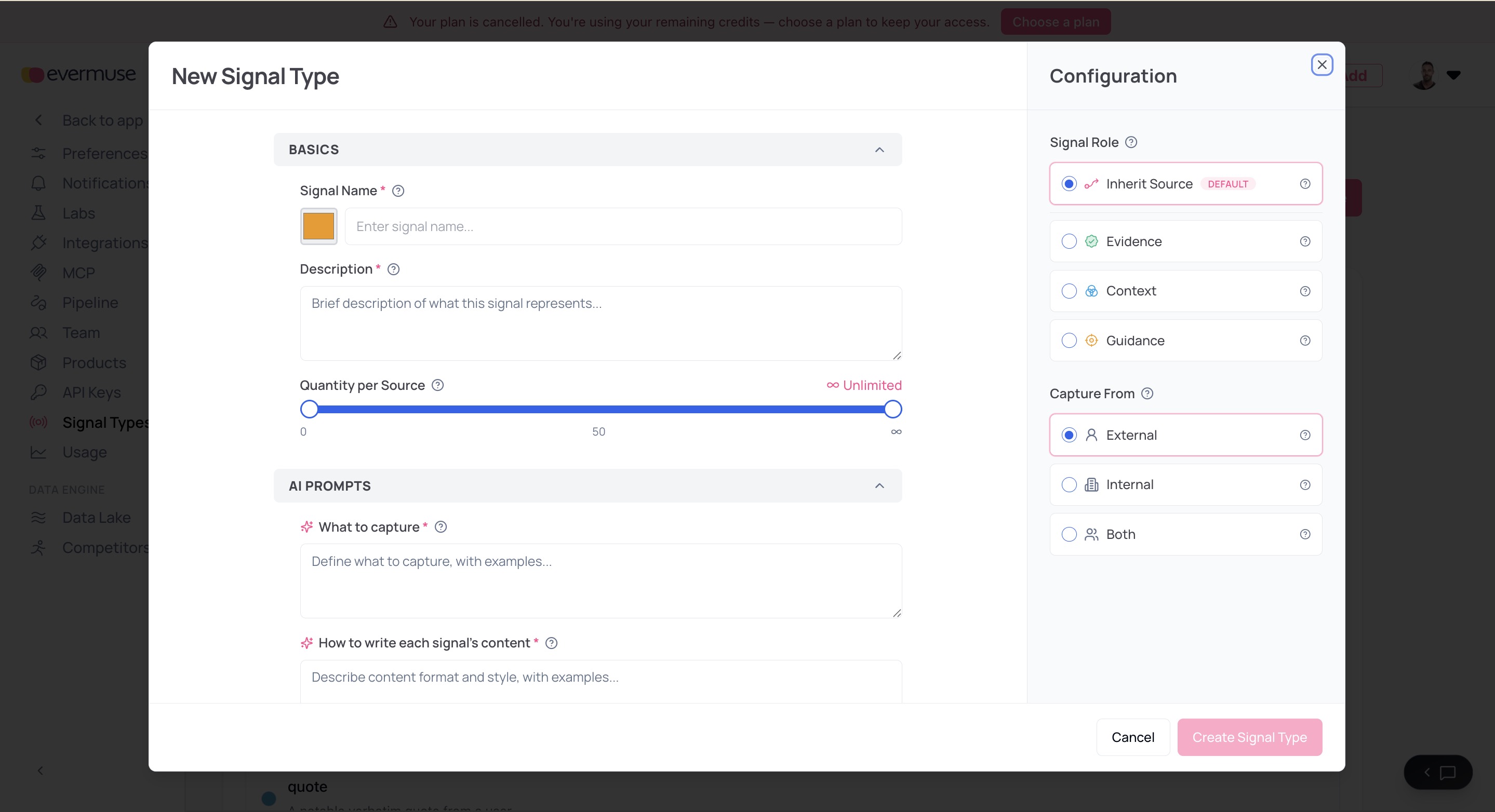
Until now, Evermuse extracted a fixed set of signals from your conversations - needs, problems, feature requests. In July, you can define your own. Create a custom signal type once, and Evermuse extracts it from every meeting as part of processing, right alongside the built-in ones.
- Your own signal taxonomy. A new Signal Types settings tab lets you create, edit, and manage custom signal types, gated behind Labs while it bakes. Track whatever matters to your team - competitor mentions, pricing objections, churn risk, a category only you would think to look for.
- Extracted automatically. Every meeting now runs custom-signal extraction as part of the standard processing flow, so your signals populate without any extra step.
- Searchable by nature. Custom signals land in the same unified signals collection as everything else, and search can filter by signal nature - from the app or from your MCP client - so you can pull just the ones you care about.
🔌 First-party integrations: connect a source once, keep it in sync
Evermuse already lets you push data in through the Push API and from your AI tools over MCP. July adds a third path: native, first-party integrations that connect a source once and keep it flowing on a schedule, ingested through the same pipeline as your meetings. Slack is the first connector.
- Slack, connected in a few steps. A guided setup walks you through connecting a Slack workspace, choosing channels, and running a historical import, then keeps new messages syncing on a recurring schedule.
- Data Filters. A workspace-level rule engine decides what to allow, hold, or exclude before anything becomes a source, so you ingest the conversations that matter and skip the noise.
- Built to stay healthy. Private-channel gating, incremental sync windows, and automatic detection of disconnected sources keep the integration running without babysitting, and each step of setup surfaces its own clear error if something needs attention.
👥 A Customers view
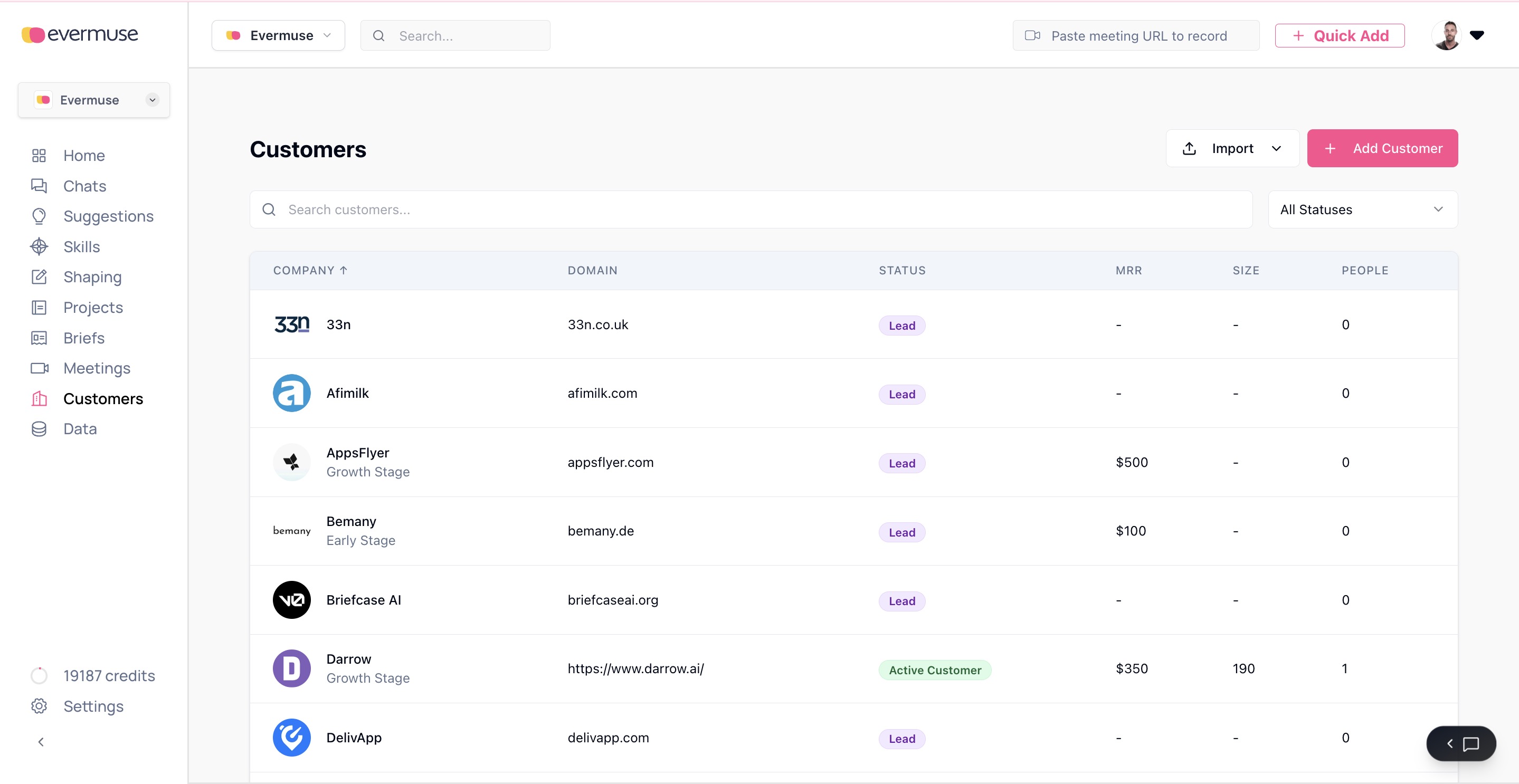
Evermuse now has a dedicated Customers tab that groups conversations and signal by the customer they came from. Meetings are matched to a customer by email domain and scoped to your workspace, so each customer’s view stays clean and complete. It’s rolling out behind a flag as we polish it.
💳 Plan upgrades, handled in-app
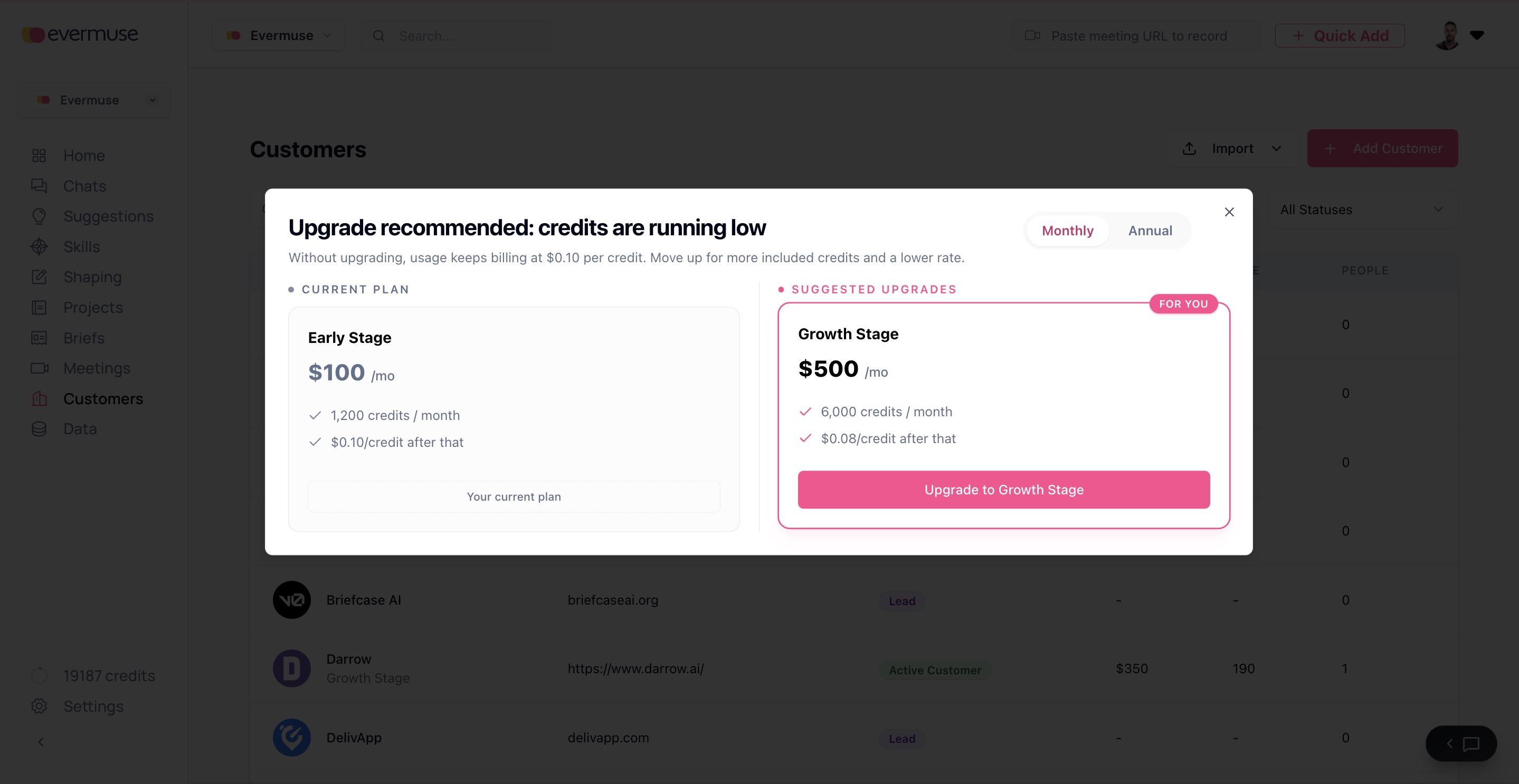
Changing plans no longer means leaving Evermuse. July brings an in-app upgrade flow, a real plan catalog, and nudges that show up before you’re blocked.
- Upgrade without leaving the app. Move to a higher tier in-app, monthly or annual, with the change persisting reliably. Error responses are no longer mistaken for success, so a failed upgrade tells you so.
- A clearer upgrade path. The upgrade dialog shows your current plan beside the next tier only - no confusing downgrade options to wade through.
- Timely nudges. A notice bar appears at 70% credit usage, and the upgrade dialog auto-opens when your usable balance dips below 50 credits or on login, so you top up before you hit a wall instead of after.
🚪 A smoother onboarding
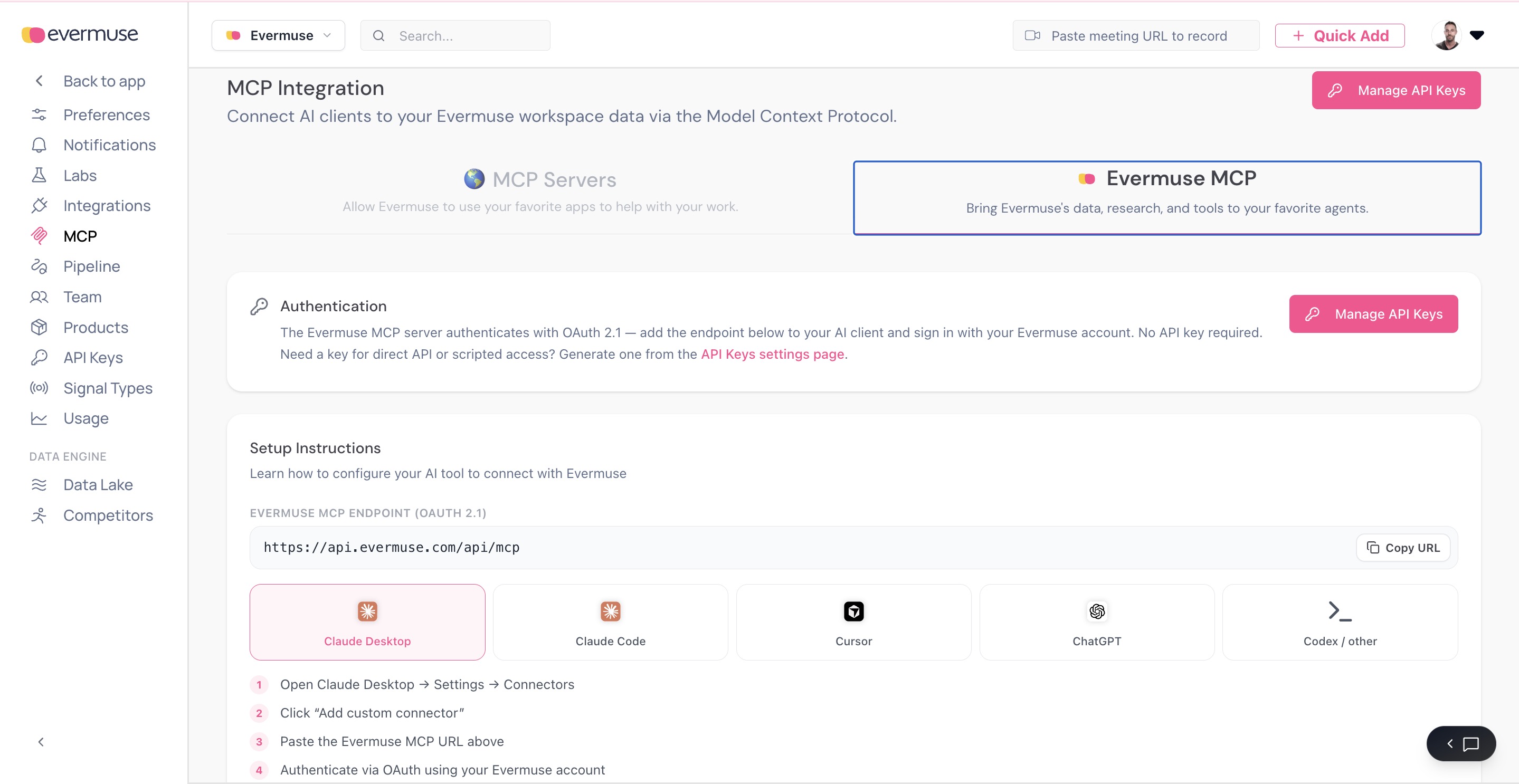
Getting into Evermuse - and connecting it to your AI tools - got noticeably smoother.
- A guided signup stepper. A new multi-step signup flow replaces the old one-shot form, walking new users through setup one step at a time.
- Notification preferences from the start. Set how you want to be notified during onboarding, instead of hunting for the setting later.
- Auto-join for teammates. When someone signs up on your company domain, a first-signup modal helps them land in the right workspace instead of creating a stray one.
- Faster MCP setup. A new
/setup-evermuseonboarding skill guides MCP clients through connecting Evermuse, and we fixed a set of issues for users signing up through MCP - so wiring up Claude, Cursor, and friends is now a guided flow.
🎯 Sharper extraction and a healthier pipeline
A round of accuracy and reliability work on how signal gets extracted and ingested:
- More accurate signal detection. Director accuracy improvements plus a certainty running-min fix mean cleaner, better-calibrated signal.
- Bot-meeting analysis restored. Fixed the analysis pipeline for bot-recorded meetings (UM-648), so meetings joined by the Evermuse notetaker process end to end again.
- Ingest improvements. Optional project IDs when pushing sources in, more robust gzip batch handling on conversions, a call-transcription buffer fix, and internal fields trimmed out of API responses.
⚙️ Under the hood
Foundational work that keeps the app fast and dependable as it grows:
- TypeScript everywhere. Backend routes migrated from JavaScript to TypeScript, tightening type safety across the API.
- More test coverage. Route and unit coverage added across API keys, OAuth, integrations, and signal types.
- More resilient real-time. Firestore real-time listeners now have proper error handlers, so a transient hiccup no longer leaves a screen silently stale.
- Steadier CI. Fixed a flaky Inngest CLI check and pinned the services Node engine for reproducible builds.
✨ Polish
A handful of smaller fixes that add up:
- New Signal Type dialog inherits the correct source role and stamps the custom-signal nature, with dark-mode fixes.
- Integration cards gained a settings cog and a round of UI polish.
- Slack setup no longer deadlocks on the finish button, and stale connections are detected and surfaced.
- Sync steps respect their output limit instead of overrunning it.
For questions, feedback, or support, please reach out to the Evermuse team at team@evermuse.com - we’re here to help!